What is the difference between Front-End and Back-End?
Learn the difference between Front-End and Back-End web development, how each works, with a comprehensive explanation of the roles of front-end and back-end developers in building modern websites.
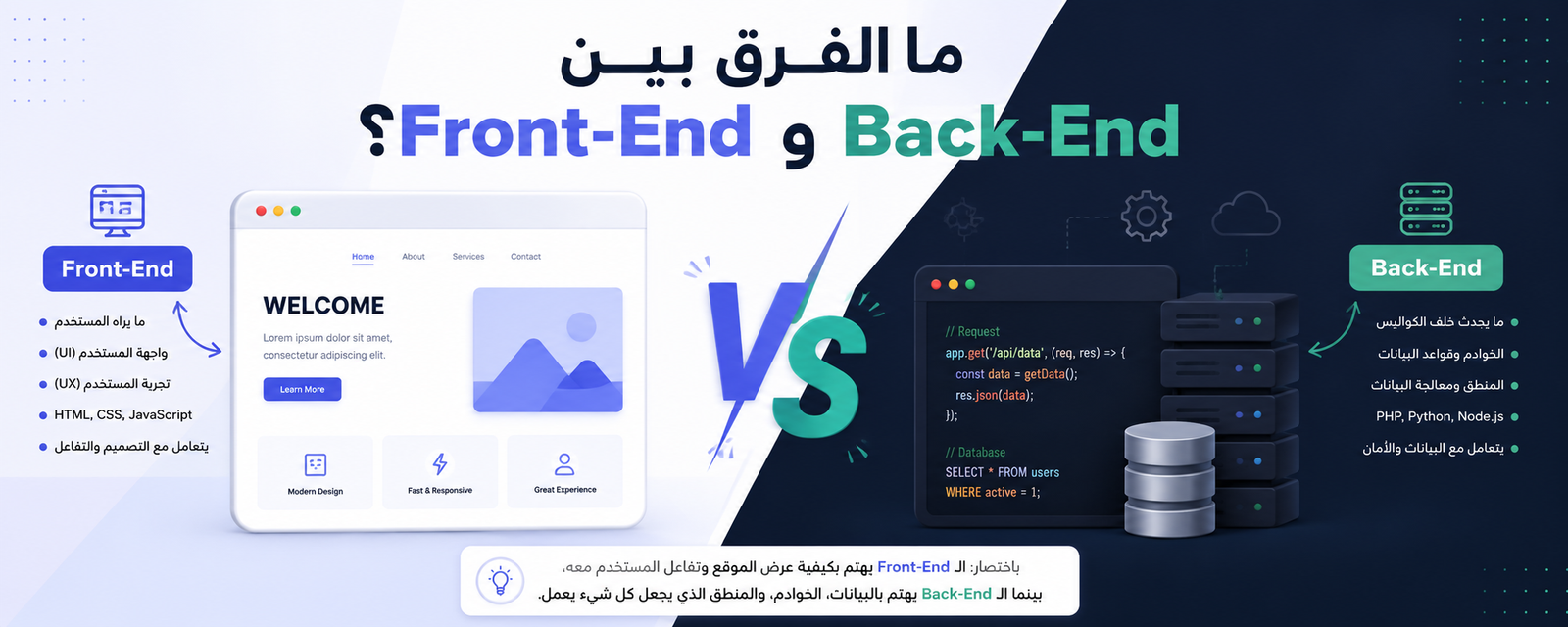
The difference between Front-End and Back-End lies in the nature of work within website development. The Front-End is responsible for everything the user sees and interacts with on the website, while the Back-End handles everything happening behind the scenes, such as data processing, server operations, and system management. Both work together to create a professional website that users rely on daily.
In the world of web development, the role of a developer front cannot be separated from the back-end developer’s role, because any successful website depends on the integration of both sides to deliver a smooth, fast, and secure user experience.
What is Front-End in Web Development?
Definition of Front-End
The Front-End is the visible part of a website, meaning everything displayed to the user when opening a web page. It includes design, colors, buttons, images, and interactive menus.
The front end field relies on essential languages and technologies that make the website dynamic and interactive instead of static pages.
Responsibilities of a Front-End Developer
A developer front performs several key tasks, including:
- Designing an attractive user interface
- Converting designs into real web pages
- Improving user experience (UX)
- Ensuring compatibility with mobile and desktop devices
- Adding interactivity to the website
Main Front-End Languages and Technologies
The front end field depends on a set of core technologies:
1. HTML
Used to build the structure of the page.
2. CSS
Used for styling colors, fonts, and layout.
3. JavaScript
Used to add interactivity and motion to the website.
These technologies form the foundation of any front end development work.
Importance of Front-End in User Experience
First Impression of the Website
The website interface is the first thing a user sees, so the success of any website heavily depends on the quality of front end design.
Improving Interaction
When a developer front performs professionally, user engagement increases, such as:
- Easy button clicking
- Smooth page navigation
- Fast responsiveness
Device Compatibility
The front end must work efficiently across:
- Smartphones
- Tablets
- Desktop computers
What is Back-End in Web Development?
Definition of Back-End
The Back-End is the non-visible part of the website responsible for data processing and full system management. Users cannot see it, but it is the core foundation of any website.
Responsibilities of Back-End
The Back End performs several important functions:
- Processing user requests
- Managing databases
- Securing information
- Running servers
- Connecting the website with external systems
Main Back-End Languages
Back-End development relies on powerful languages such as:
- PHP
- Python
- Node.js
- Java
Each language provides a different way of managing system operations.
Importance of Back-End in Website Functionality
Data Management
Any website relies on the Back End to store and manage data such as:
- User accounts
- Orders
- Messages
- Products
Security and Protection
The Back-End is the main defense layer against:
- Hacking
- Data loss
- Information manipulation
Running Business Logic
All calculations and logical operations are handled inside the Back End, not the front interface.
Relationship Between Front-End and Back-End
How Do They Work Together?
When using any website:
- The user interacts with the interface (Front-End)
- A request is sent to the server (Back-End)
- The server processes the request
- The result is sent back to the interface
Simple Practical Example
During login:
- The user enters data in the front end
- Data is sent to the Back End
- The data is verified
- Access is granted or denied
Why Neither Can Be Replaced
Front-End Without Back-End
The website would be only a visual interface without real functionality.
Back-End Without Front-End
The system would exist but without a user interface to interact with it.
Core Difference Between Front-End and Back-End
Front-End: What the User Sees
The front end includes everything displayed on the screen, such as:
- Page design
- Buttons and menus
- Images and interactive elements
- Page navigation
Its main goal is to deliver a smooth and attractive user experience.
Back-End: What the User Does Not See
The Back End is the hidden part that handles:
- Databases
- Servers
- Request processing
- Account management
Its main goal is to operate the system correctly and securely from the inside.
Practical Comparison Between Front-End and Back-End
By Function
- Front-End: Focuses on design and interaction
- Back-End: Focuses on logic and processing
By Visibility
- Front-End: Visible to the user
- Back-End: Invisible to the user
By Tools
Front-End Tools:
- HTML
- CSS
- JavaScript
- React / Vue
Back-End Tools:
- PHP
- Node.js
- Python
- Java
Front-End Developer Skills
What should a developer front master?
To become a professional developer front, the following skills are essential:
- Proficiency in HTML and CSS
- Deep understanding of JavaScript
- Handling user interfaces
- UI/UX design knowledge
- Website performance optimization
Importance of Creativity in Front-End
The front end field relies heavily on creativity, because the goal is not just writing code, but:
- Designing a comfortable visual experience
- Making the website easier to use
- Increasing user engagement and retention
Back-End Developer Skills
What should a Back-End developer master?
A Back End developer needs to:
- Understand databases
- Manage servers
- Work with APIs
- Write strong business logic
- Secure data and systems
Importance of Programming Logic
Unlike front end, which focuses on appearance, Back End relies on:
- Logical thinking
- Problem-solving
- Managing complex operations
Tools Used in Front-End and Back-End
Front-End Tools
A developer front uses tools such as:
- Visual Studio Code
- Figma (for design)
- Chrome DevTools
- React / Angular
Back-End Tools
A Back-End developer uses:
- Node.js
- Laravel
- Django
- MySQL / MongoDB
Difference in Thinking Between Front-End and Back-End
Front-End Developer
A Front-End developer thinks:
- How does the user see the website?
- How can I make the experience easy and attractive?
Back-End Developer
A Back-End developer thinks:
- How does the system work internally?
- How is data secured?
- How are requests processed efficiently?
How Front-End and Back-End Affect Website Performance
Front-End Performance
If the front end is poorly built:
- The website feels visually slow
- Users leave quickly
- The experience becomes confusing
Back-End Performance
If the Back End is weak:
- The website crashes
- Data may be lost
- Operations become slow
Practical Example
When opening a website:
- Front-End: Displays the page to the user
- Back-End: Fetches data from the server
When logging in:
- Front-End: Receives user input
- Back-End: Verifies credentials and grants access
Integrated Relationship Between Front-End and Back-End
There is no real separation
In reality, no website can function without integration between:
- Front-End
- Back-End
Both work as a single system in any web development project.
Role of a developer front in the Team
A developer front plays an important role in:
- Converting designs into code
- Improving user experience
- Ensuring cross-device compatibility
How Front-End and Back-End Are Connected
Core Concept
Any website is based on a simple principle:
- Front-End displays data
- Back-End processes data
- Information is exchanged via APIs
What is an API in Web Development?
Definition of API
API stands for Application Programming Interface, which acts as a bridge allowing the front end to communicate with the Back End.
How API Works
When performing any action on a website:
- The user interacts with the front end
- A request is sent to the Back End via API
- The server processes the request
- The response is sent back to the interface
Practical Example of Front-End and Back-End
Login Process
- The user enters data in the front end
- Data is sent to the Back End
- The system verifies the data
- A result (success or failure) is returned
E-commerce Example
When purchasing a product:
- The front end displays the product
- The user clicks “Buy”
- The request is sent to the Back End
- The order is stored in the database
- Confirmation is sent to the user
Role of Front-End in Communication with Back-End
Responsibilities of developer front
A developer front:
- Sends requests to the server
- Receives data
- Displays results properly to users
Improving User Experience
When the front end is well implemented:
- Faster experience
- Easier navigation
- More interactive interface
Role of Back-End in Data Processing
What happens inside Back-End?
Inside the Back End:
- Data validation
- Business logic execution
- Database management
- Security enforcement
Importance of Back-End Speed
If the Back End is slow:
- The website becomes delayed
- User experience is affected
- System efficiency decreases
How Data Moves Between Front-End and Back-End
Data Flow Steps
- User clicks a button in the front end
- A request is created
- Request is sent to the Back End
- Data is processed
- A response is returned
- Result is displayed on the interface
Types of Data Between Front-End and Back-End
1. User Data
Such as:
- Name
- Password
2. Product Data
Such as:
- Price
- Images
- Description
3. Transaction Data
Such as:
- Orders
- Payments
- Messages
Importance of APIs in Web Development
Why is API important?
Without an API, the front end cannot communicate with the Back End.
API Use Cases
APIs are used for:
- Login authentication
- Displaying data
- Sending requests
- Updating information
How Integration Affects Website Performance
Strong Integration
When the connection between front end and Back End is strong:
- The website is fast
- Data is accurate
- User experience is excellent
Weak Integration
If the connection is weak:
- Delayed data loading
- Display errors
- Poor user experience
Role of developer front in Integration
Key Responsibilities
A developer front is responsible for:
- Designing interfaces that interact with APIs
- Displaying data in an organized way
- Improving response speed
Real-World Example from Modern Websites
Booking Platform
- Front-End: displays available appointments
- Back-End: checks availability
- API: transfers data between both
Why This Integration is Essential
Because any web development project depends on:
- Front-End for displaying content
- Back-End for processing data
- APIs for connecting both systems
Types of Front-End Development
1. Traditional Front-End Development
This type is based on building simple web pages using:
- HTML
- CSS
- JavaScript
Use Cases:
- Informational websites
- Static pages
- Simple blogs
2. Interactive Front-End Development
This uses advanced front end technologies such as:
- React
- Vue
- Angular
Features:
- Smooth user experience
- Data updates without page reload
- High user interaction
3. SPA (Single Page Applications)
SPA means a Single Page Application, which relies on:
- Loading a single page only
- Dynamic content updates
Examples:
- Management systems
- Educational platforms
- Admin dashboards
Front-End Developer Responsibilities by Level
Beginner
- Creating simple pages
- Using HTML and CSS
Intermediate
- Working with JavaScript
- Connecting with APIs
- Improving user experience
Professional (developer front)
- Building complete applications
- Using frameworks
- Optimizing performance and speed
Types of Back-End Development
1. Traditional Server-Side Development
Based on languages such as:
- PHP
- Python
- Java
Use Cases:
- Corporate websites
- Content management systems
2. Modern API-Based Back-End Development
Based on:
- Node.js
- REST APIs
- GraphQL
Features:
- Fast data exchange
- Flexible front-end integration
- Suitable for modern applications
3. Large-Scale Back-End Systems
Used in:
- Banks
- Large platforms
- Government systems
Technologies:
- Microservices
- Cloud systems
- Kubernetes
Back-End Developer Responsibilities
Core Responsibilities
- Database management
- Request handling
- Data security
Advanced Responsibilities
- API development
- Performance optimization
- Server management
Front-End vs Back-End by Function
Front-End
- Focuses on appearance
- User-oriented
- Runs in the browser
Back-End
- Focuses on logic
- Data-oriented
- Runs on the server
How Developers Choose Their Path
If you like design
Choose front end
If you like logic and analysis
Choose Back End
If you want both
Choose Full Stack Development
Modern Front-End Tools
Basic Tools
- VS Code
- Chrome DevTools
- GitHub
Frameworks
- React
- Vue
- Angular
Modern Back-End Tools
Languages & Frameworks
- Node.js
- Laravel
- Django
Databases
- MySQL
- MongoDB
- PostgreSQL
Front-End and Back-End in Modern Projects
Full Integration
Modern projects rely on:
- Front-End for UI
- Back-End for processing
- APIs for connection
Role of developer front in Modern Projects
Key Responsibilities
- Building professional interfaces
- Improving performance
- Working with APIs
- Ensuring excellent UX
Example of a Full System Project
Appointment Booking App
- Front-End: displays schedules
- Back-End: manages bookings
- API: connects both systems
Why Understanding This Difference Matters
Because any developer or business owner must understand:
- How the system works internally
- How tasks are distributed
- How to build a professional website
Final Comparison Between Front-End and Back-End
By Goal
- Front-End: UI/UX and design
- Back-End: data and system operations
By Environment
- Front-End: runs in the browser
- Back-End: runs on the server
By Tools
Front-End:
- HTML
- CSS
- JavaScript
- React / Vue / Angular
Back-End:
- PHP
- Node.js
- Python
- Java
By Visibility
- Front-End: visible to users
- Back-End: hidden from users
Importance of Front-End and Back-End in Website Success
Importance of Front-End
The front end is the first thing users see, so it directly affects:
- First impression
- Ease of use
- User interaction
Importance of Back-End
The Back-End is the backbone of the system, affecting:
- Processing speed
- Data security
- System stability
How Front-End and Back-End Integration Creates Success
Integrated System
Any successful website depends on:
- Professional UI (Front-End)
- Strong system (Back-End)
- Smart API integration
Practical Example
In an e-commerce store:
- front end displays products
- user selects a product
- Back-End processes the order
- data updates in real-time
Role of developer front in the Modern Market
Advanced Responsibilities
The role of a developer front now includes:
- Building full web applications
- Improving performance and UX
- Working with APIs
- Creating smart and fast interfaces
Future of Front-End and Back-End
AI Transformation
Web development is becoming more intelligent through:
- AI-based systems
- Advanced interactive interfaces
- User behavior analysis
Rise of Full Stack Development
The future is moving toward:
- Full-stack developers
- Combined Front-End and Back-End knowledge
- Integrated systems
Emerging Technologies
- Serverless Architecture
- Cloud Computing
- Microservices
- Real-time Applications
Common Mistakes in Understanding Front-End and Back-End
Mixing Both Fields
Some beginners think:
- Front-End is only design
- Back-End is only coding
This is incorrect.
Ignoring Integration
Weak integration between front end and Back End leads to:
- Data errors
- Slow performance
- Poor user experience
Professional Tips for Developers
- Understand both fields
- Do not focus on one side only
- Learn APIs basics
- Improve problem-solving skills
- Build real projects
Conclusion
In conclusion, the difference between Front-End and Back-End is not a competition between two fields but a necessary integration for building any successful website. The front end delivers an attractive and user-friendly experience, while the Back End ensures the system runs efficiently and securely.
The success of any digital project depends on understanding this integration rather than choosing one side only. If you want to enter web development, start with the basics and then choose your path—whether front end, Back End, or full developer front specialization.
Start your journey today into the world of web development and learn how to build professional digital projects that combine strong design with smart system architecture.
FAQ
What is the main difference between Front-End and Back-End?
Front-End focuses on the user interface, while Back-End handles data processing and website functionality.
Can a website work without a Back-End?
Simple websites can, but professional websites require a Back-End.
What is a developer front?
It is a developer responsible for building user interfaces using HTML, CSS, and JavaScript.
Which is harder, Front-End or Back-End?
It depends on skills; Front-End requires creativity, while Back-End requires logic and analysis.
Got a project in mind?
Bring the idea — we'll deliver the product your customers will love.
Get in Touch